
The phone is propped up, the Christmas tree is glowing, and you have finally squeezed onto the sofa beside your dog. Then the countdown ends just as a curious nose fills the lens. The photograph contains half your face, a blur of tail, and an excellent view of the ceiling.
Before trying again, change the setup. These Christmas pet photo ideas work around familiar places at home, with room for you to join the picture. Choose one scene, check the light, and take a wider version for your Christmas card. You can do the rest another day.
✦ Six Christmas Pet Photo Ideas to Try at Home
Start with the place your pet already likes. A window seat, sofa cushion, or familiar rug gives you somewhere useful to begin without assembling a studio. Put decorations in the background, beyond your pet's reach. The ASPCA's holiday safety guidance flags hazards including exposed wires, tinsel, and unattended candles, so leave those out of the setup.
1. A Window Portrait With One Festive Detail
Choose a familiar spot beside a window with soft daylight. A red cushion on the sofa behind your dog, or a green throw folded over a nearby chair, can suggest Christmas without putting anything on your pet.
Bring the phone down toward eye level and check that the face is bright enough to see clearly. Keep the window to one side rather than directly behind the head. Take one close portrait and one wider frame with space around the ears and paws.
For a cat, begin where they naturally pause. If they leave the window, move on to their next resting place instead of carrying them back.
2. A Sofa Photo With You in the Frame
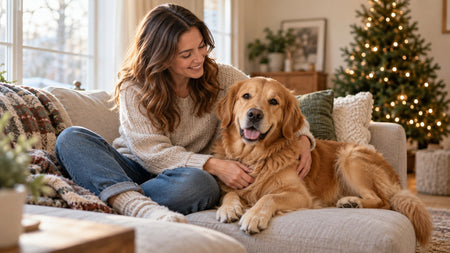
Sit where you usually sit and leave your pet's usual space available. Set the phone on a stable stand facing the sofa, then take a test photograph before joining the scene. Check both the space above your head and the cushion where your pet will be.
Let your dog lean against your leg or your cat settle beside you. Looking down at your pet can work just as well as looking into the lens. Keep your hand away from their face so both expressions remain visible.
If your pet chooses the other end of the sofa, turn the composition into a wider portrait rather than repeatedly closing the gap.
3. A Christmas Tree in the Background
For dog Christmas photo ideas with an unmistakable holiday setting, keep the tree behind the action. Begin in daylight, with you and your dog in a brighter part of the room. The lights can provide a background detail without having to illuminate your faces.
Frame from farther back so the tree, person, and pet each have space. Your dog can sit on a familiar rug several steps away from the decorations. There is no need to place them underneath the branches.
If the tree looks beautiful but faces disappear into shadow, keep the composition and change the light or shooting time. Check faces before adjusting anything else.

4. A Cat in Their Favorite Spot
A cat stretched across a chair back already gives you a workable scene. Look for a comfortable perch with a simple background, then add the Christmas connection through the room: a muted green curtain, a red cushion farther away, or the tree across the room.
Sit beside the chair so your profile or forearm enters the frame. Keep their route off the perch clear. A picture of you reading beside a resting cat needs no synchronized posing.
If the cat watches from a distance, photograph that view. Take a separate portrait of yourself afterward if you want a two-photo card layout. Holding the cat is optional.
5. A Family Photo From Pet Height
Bring people lower so your dog has a visible place in the photograph. Adults can sit on the sofa edge or floor, with the pet beside them rather than hidden among standing legs. Leave the photographer a clear view of every face.
Try to keep faces at a similar distance from the phone. A dog far forward and people far behind can make it harder to get everyone clearly in focus. Take a test frame and check the pet as carefully as the people.
With several pets, separate photographs are a practical alternative. A card can hold more than one image; the household does not have to fit into one coordinated moment.
6. A Candid Christmas Morning
Keep the phone ready during an ordinary quiet moment. You might be sitting with a mug while your dog rests on a familiar blanket, or sharing the sofa with a cat while daylight reaches the room. A glimpse of the tree supplies the occasion.
Ask someone nearby to photograph the pause, or set up the phone before sitting down. Leave drinks on a stable surface away from your pet and skip scenes built around chewing wrapping paper or investigating food gifts.
Take the photograph when the moment happens. If your pet gets up, let the scene end rather than asking everyone to recreate it.
♡ Get Yourself in the Picture
Prepare the phone before inviting your pet to join you. Check the framing using your empty seat, test the shutter method, and make sure the support cannot tip into your pet's space.
A helper is often the simplest option. Ask them to stay near the lens, keep movements small, and photograph you interacting first. Calling from another corner can send your pet out of the frame.
If you are alone, use a timer or remote shutter supported by your device. Test it once without your pet: how much time do you have to sit down, and does the phone take one photograph or several? Timer and burst behavior varies by device and mode.
Canon's pet photography guide with Jenn Cooper recommends preparing before the moment and getting down to your pet's level. Apply those ideas to your room, then move yourself beside your pet's chosen spot.
Frame the place first. Join your pet second.
Take a natural interaction before attempting a camera-facing portrait. If your pet walks away or avoids the setup, pause or finish.

◇ Fix the Shot Before Taking More
Review one photograph at full size before taking another series. Zoom in on both faces, check the edges, and identify what you want to change. A small adjustment is more useful than repeating the same setup.
| What you see | What to check | Try next |
|---|---|---|
| Bright tree, dark faces | Is most of the light behind you? | Photograph in daylight and place faces toward soft window light. Keep the tree farther behind. |
| A blurred pet in every frame | Is your pet moving in dim light? | Use a brighter spot, wait for a natural pause, or try burst capture if your device supports it. |
| Your face is clear, your pet is soft | Are you at different distances from the lens, or is focus misplaced? | Sit closer to the same plane and check focus on both faces. |
| A stretched muzzle or face | Is the lens very close, especially in an ultrawide view? | Move the phone farther away and reframe without crowding the face. |
These are starting points, since one symptom can have several causes. Change one thing, take a test frame, and compare it with the previous photograph. Keep whichever version shows the people and pet more clearly.
⌂ Leave Room for the Christmas Card
Open your intended card template before finishing the photographs. Check its orientation and where the greeting will sit. A close portrait may look lovely on your phone while leaving no room for text.
Take an extra frame with more space around everyone. A quiet area of wall or curtain beside the subjects can hold a message without covering a face. Adobe's guide to negative space explains how empty areas help define the subject; here, that breathing room also gives your card layout somewhere to work.
| Photo version | What to preserve |
|---|---|
| Christmas card | The template's proportions, greeting space, and complete faces after cropping. |
| Family album or shared image | The interaction and enough of the room to show where it happened. |
| Optional keepsake reference | A clear subject and natural color in the original file. |
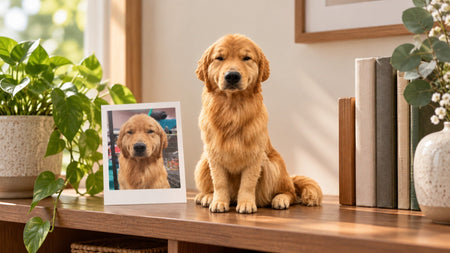
For a keepsake reference, see the existing custom dog figurine photo guide.
If you have not picked a template, take separate horizontal and vertical versions. Preview the actual card crop and follow that service's file and print requirements. Save the original before exporting card and sharing copies.
✓ Choose One Photo to Keep
Choose a photograph where you and your pet are visible, check it in the card layout, and save the uncropped original. You do not need to complete all six scenes to have a useful Christmas portrait.
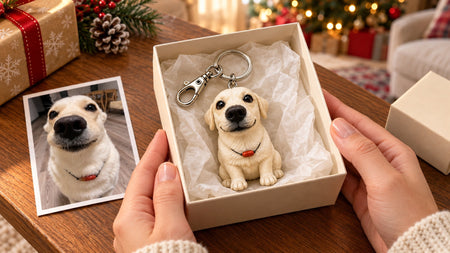
For a tangible version, DoDoWish offers custom pet keychains and handcrafted pet figurines, with hand-painted detail on resin. You can review the digital preview and request revisions before approving physical crafting.
Keep a favorite face from this Christmas in a handcrafted pet keepsake.
Create a Pet Keychain Explore Pet FigurinesStart with one familiar spot and one photograph. You can choose its final form once you have the picture.
- Custom pet keychains and figurines created from your pet photos.
- Hand-painted detail on substantial artisan resin.
- Digital preview review and revisions before you approve physical crafting.
Frequently Asked Questions
What are some cute Christmas photo ideas for dogs?
Try a window portrait with a festive cushion in the background, a sofa photo beside you, or a familiar rug with the Christmas tree farther behind. Start in a spot your dog already likes. Keep decorations out of reach and check that the face is clearly visible.
How can I take a Christmas photo with my pet when I am alone?
Place your phone on a stable stand and test the framing before joining your pet. Use a timer or remote shutter supported by your device. Check the countdown and capture behavior first, then sit beside your pet's usual resting spot. Stop or pause if your pet leaves.
How can I take Christmas photos of a cat that will not sit still?
Photograph your cat where they naturally pause, such as a window seat or chair back. Keep the setup simple and take the picture during a quiet moment. Sit nearby if you want to join the frame. You can use separate portraits in a card layout if your cat prefers more space.
Why does my pet look dark in front of the Christmas tree?
Check whether the bright tree or window is behind your pet while the face receives little light. Try daylight and soft window light on the face, keeping the tree in the background. Take a test photograph and check the face before repeating the setup.
Should I take horizontal or vertical pet photos for Christmas cards?
Match the orientation to your chosen Christmas card template and leave room for its greeting. If the template is undecided, take both horizontal and vertical versions. Preview the actual crop before ordering, and follow the card service's file requirements. Keep an uncropped original.
Can a Christmas card photo also be used for a custom pet keepsake?
A clear original may be suitable as a reference for a DoDoWish custom pet keychain or figurine. Submit the uncropped file rather than a card screenshot or heavily filtered export. Suitability depends on visible detail and the requested piece; review the digital preview before approving physical crafting.